oh-my-zsh

in tool

I use zsh for my default shell.
And oh-my-zsh for enhance zsh
my zshrc
Installation
Make sure you there is zsh on your machine.
If you want to change zsh to default shell, just type $ chsh -s /bin/zsh.
There are possible zsh path. Or you can $ where zsh to find the path

1
2
/bin/zsh
/usr/local/bin/zsh

oh-my-zsh

1
2
3
$ git clone git://github.com/robbyrussell/oh-my-zsh.git ~/.oh-my-zsh
$ cp ~/.zshrc ~/.zshrc.orig
$ cp ~/.oh-my-zsh/templates/zshrc.zsh-template ~/.zshrc

Customized .zshrc !

Tips

可以利用

1
for x in 0 1 4 5 7 8; do for i in `seq 30 37`; do for a in `seq 40 47`; do echo -ne "\e[$x;$i;$a""m\\\e[$x;$i;$a""m\e[0;37;40m "; done; echo; done; done; echo "";

來查看terminal所有的顏色

Comment and share

vim

in tool

Default Usage

There is lots of tutorial on the Internet.
You can google or use the $ vimtutor to learn how to use basic.
http://www.openvim.com/
http://vim-adventures.com/

Tips

Search what you select
  1. visual mode select word or sentance (v + hjklew.. and y for yank)
  2. /
  3. ^r
  4. "
    Done

text object: w,s,p,t
motions: a,i,t,f,F
command: d,c,y,v

Combine: diw, ciw etc…

查詢所有key map
vim原生:help index
查詢pluginmap:verbose map :verbose map!
:help map-listing
:help :map-verbose
:help :verbose
:help :verbose-cmd
:help map-which-keys

vimrc

The configuration of vim
Here is my vim configuration on the github.
Basic configuration: vimrc
Plugin configuration: vimrc.bundle

My vim screenshotMy vim screenshot

Vundle

Vundle is a Vim plugin manager.

Installation

1
git clone https://github.com/gmarik/Vundle.vim.git ~/.vim/bundle/Vundle.vim

Add in .vimrc

.vimrc
1
2
3
4
5
6
7
8
9
10
set nocompatible              " be iMproved, required
filetype off " required

"set the runtime path to include Vundle and initialize
set rtp+=~/.vim/bundle/Vundle.vim
call vundle#begin()

Plugin 'gmarik/Vundle.vim'

call vundle#end() " required

filetype plugin indent on " required

And reopen vim, try the command :BundleList to check the plugin you install now
Other command

1
2
3
4
5
6
$ BundleInstall
$ BundleSearch
$ BundleList
$ BundleUpdate
$ BundleClean
$ BundleDocs

Comment and share

Irssi

in tool

Notes for using irssi of irc client

1
2
3
4
5
/connect irc.freenode.net
/away [message] # Setting the away message, if somebody msg to me , it will auto resend the message to the person.
/me [message] # Like broadcast, it will display on difference color.
/msg NickServ REGISTER <password>
/msg NickServ IDENTIFY <password>

Configuration

.irssi/config
1
2
3
4
5
6
7
8
9
10
11
12
13
14
15
16
17
18
19
20
21
22
23
24
25
26
27
28
29
30
31
32
33
34
35
36
37
## Setting the auto connect servers
servers = (
{
address = "irc.freenode.net";
chatnet = "freenode";
port = "6667";
use_ssl = "no";
ssl_verify = "no";
autoconnect = "yes";
}
);

## and auto identify the nickname
chatnets = {
freenode = {
type = "IRC";
nick = "[nickname]";
autosendcmd = "/msg NickServ identify [your password] ;wait 2000";
};
};


## Setting the autojoin channels with password
channels = (
{
name = "#[channel name]";
chatnet = "freenode";
autojoin = "yes";
password = "[channel password]";
}
);

## ignore the specific message in the channels
ignores = (
{ level = "JOINS QUITS"; channels = ( "#archlinux" ); },
{ level = "JOINS QUITS"; channels = ( "#ubuntu" ); },
);

Theme

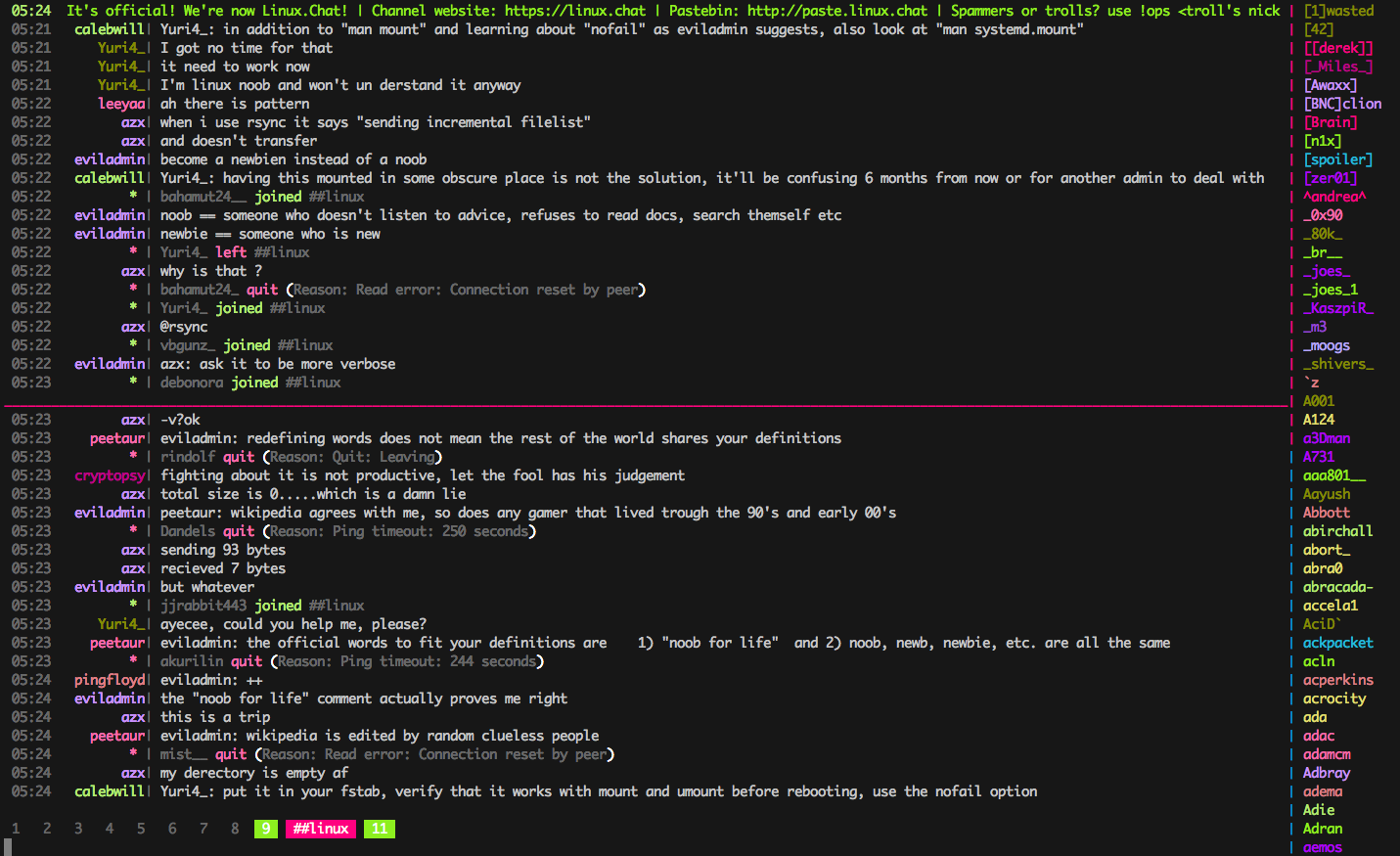
I use weed for the irssi Theme

irssi screenshotirssi screenshot

Add a new file startup in .irssi directory. It will auto run when the irssi startup.
Each line is a independent command, without /

.irssi/startup
1
2
3
4
5
6
7
8
9
10
11
12
13
14
15
16
script load awl

script load usercount.pl
sbar awl_0 add -before awl_0 -alignment left usercount

script load trackbar22
set trackbar_string _
set trackbar_style %r

script load awaybar
sbar statusbar add -after erotin -alignment right awaybar

script load tmux-nicklist-portable

script load nickcolor_expando
neatcolor colors add X30

If you can’t find the script, download from

1
$ wget [link_above] -P ~/.irssi/scripts/

Comment and share

Start the road

in other

Roadmap

I want to start write some notes on this page. If I am industrious, I will write in English. But my English is not well, wish you forgive me.

  • Website related
    • Html5
    • Javascript
    • jQuery
    • ReactJS
    • PHP
    • Codeigniter
  • Desktop application
    • JavaFx
    • C#
    • Python
    • Android
  • Networks related
    • SDN
  • System management
    • linux
    • freebsd
  • IDE related
    • Sublime text
    • Vim
    • Atom
    • Visual studio

Wish I can work hard.
Wayne Lee 2014/09/25

2015-06-08

  • DevOps
    • Jenkins
    • Gitlab
    • Saltstack
    • Ansible
    • Docker
  • Fullstack
    • Node.js
    • Koa.js
    • React Flux
    • Redux

Comment and share

  • page 1 of 1

Wayne Lee

author.bio


author.job


Taiwan